Applies to: All tiers, most useful for 3PLs billing their clients · Last reviewed: 2026-10-12
What this is
CanShip's shipments detail export gives you the raw shipment facts in a clean, client-neutral format, so you can run your own billing or reconciliation downstream. It exports as CSV or XLSX, and both use the same column set.
How to do it
- Go to Reports > Shipments to open the Shipments Report.
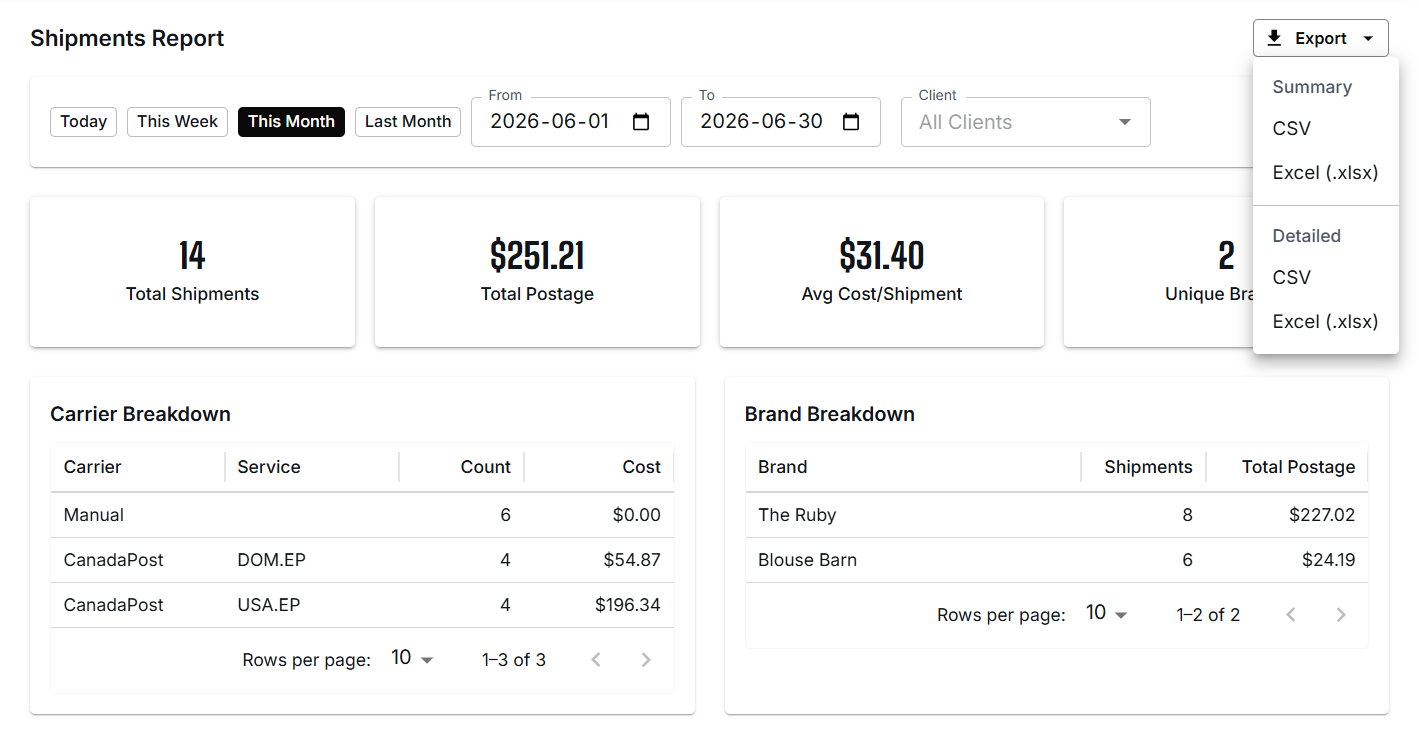
- Choose your date range (Today, This Week, This Month, Last Month, or a custom From / To) and a client if you want to scope it.
- Click Export and choose Detailed, in CSV or Excel. (A Summary export is also offered, for period totals rather than per-shipment rows.)
What is in the file
One row per label. An order shipped in two parcels has two rows, and a voided label keeps its own row. The columns use snake_case headers in a fixed order, so a spreadsheet or script can read them the same way every time. Highlights:
- Identifiers:
label_id,tracking_number,canship_order_keyandsource_order_id. For a manual order,source_order_idcarries the CanShip order number rather than exporting blank, so references are never empty. - Client: stable
client_idplus the human-readableclient_name, so each 3PL can map to its own internal codes. - Dates:
created_atis the full timestamp.ship_dateis stamped in your company's local business date, so an order labelled late in the evening bills with the correct day rather than slipping to the next. - Units:
units, the number of units on the label. - Parcel:
container,packaging_type, the dimensions in millimetres andweight_grams. - Status:
shippedorvoided. Voided labels are included and clearly flagged, so you can reconcile what actually shipped versus what was cancelled. - Carrier and cost:
carrier,service_code,service_name,cost_centsandcost_currency(CAD). The cost is in cents, and it is left empty rather than zero for manual shipments that had no captured cost. - Destination: the full ship-to address fields.
- Warehouse:
warehouse_idandwarehouse_name.
The Shipments list under Fulfillment > Shipments has its own Export CSV. That file has the list's columns (Shipment ID, Order #, Store Order, Client, Destination, Created, Ship Date, Status, Carrier, Service, Tracking, Packaging, Cost) and holds only the rows that match the search and filters you have on. It also has a Test Label column after Cost. Created is the full date and time with its offset from UTC, for example 2026-10-13T00:33:35.073-07:00.
Why it works that way
CanShip is multi-tenant: every 3PL has its own clients, codes, and contract rules. The export deliberately avoids any one 3PL's conventions and exposes stable identifiers and plain names instead, so you map them to your own billing system on your side.
What can go wrong
- A cost column is empty. Manual labels with no captured cost export an empty cost, not a zero. Treat empty as "no carrier cost recorded," not free.
- A row is a voided label. Filter on the
statuscolumn so you bill shipped rows only.
Was this article helpful?
That’s Great!
Thank you for your feedback
Sorry! We couldn't be helpful
Thank you for your feedback
Feedback sent
We appreciate your effort and will try to fix the article