Applies to: All tiers · Last reviewed: 2026-10-24
What this is
A location is a named bin or bay inside a warehouse. Locations are where stock physically lives, and two toggles decide how each one behaves. They are managed at Settings > Locations.
The two toggles
- Sellable: inventory in this location can be allocated to orders.
- Pickable: automated allocation can only draw from pickable locations. A person can still manually allocate stock that is sitting in a location which is not pickable.
In the Locations list a bin with Pickable off is chipped Overstock, which is how you spot one at a glance. The list shows both settings for every bin: Sellable or Not Sellable, and Pickable or Overstock. On Inventory, a bin that is not pickable carries the Overstock chip beside its name too.
A normal pick face is Sellable + Pickable. An overstock or reserve shelf can be Sellable but not Pickable: the stock still counts as on hand, but automated allocation will not draw from it, so move it down to a pickable bin, or allocate it by hand, before it can go on an order. A quarantine or damages bin should be not Sellable, so its stock is never promised to a customer. There is no separate location "type", the bin's job is conveyed by its name plus these two toggles.
Create a location
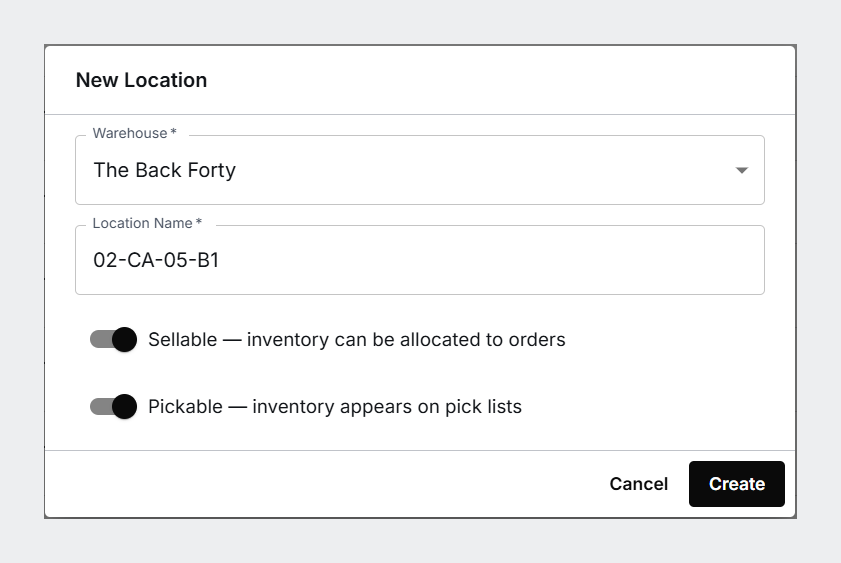
- Go to Settings > Locations > New Location.
- Choose the Warehouse (required).
- Enter the Location Name (required).
- Set Sellable and Pickable to suit the bin's role.
- Click Create.
Import locations in bulk
For a new warehouse, use Settings > Locations > Import CSV (one warehouse per import). The only required column is name. The preview validates rows before you commit, then Import N rows. Imported locations default to Sellable + Pickable, so edit any quarantine or reserve bins afterward to turn the right toggle off.
Naming bins
A consistent code makes picking faster and onboarding easier. A warehouse-style scheme like AISLE-ROW/SECTION-SHELF-BIN (for example 02-CA-01-B1 for Aisle 2, Row C Section A, Shelf 1, Bin 1) reads cleanly on a pick list and scales to thousands of bins. One SKU per bin keeps counts and picks unambiguous.
Taking a bin out of service
Turning both toggles off stops a bin being allocated from and picked from, but it stays on the list and can still be chosen as a destination when someone receives or moves stock. To take a location out of service properly, retire it. See Retiring a bin location.
To record which products belong in a bin, and to print its shelf label, see Products that belong in a bin: home bins, overflow and shelf labels.
Was this article helpful?
That’s Great!
Thank you for your feedback
Sorry! We couldn't be helpful
Thank you for your feedback
Feedback sent
We appreciate your effort and will try to fix the article